Creating an annual venue based case
You create an annual case for each venue you support. You close this case at the end of the financial year and re-create a new case for the venue.
To create a new case, you start by searching for the venue you want to associate the case with.
1 In the menu select Organisations.
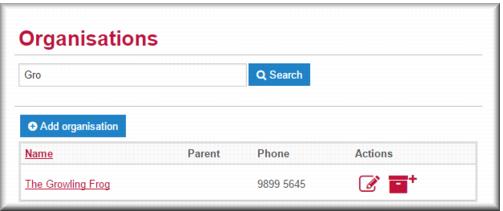
The Organisations search screen displays, showing the complete list of all venues.
2 In the search field enter the first few letters of the venue name then click

.
Venues matching your search term display. 3 Click the venue name link.
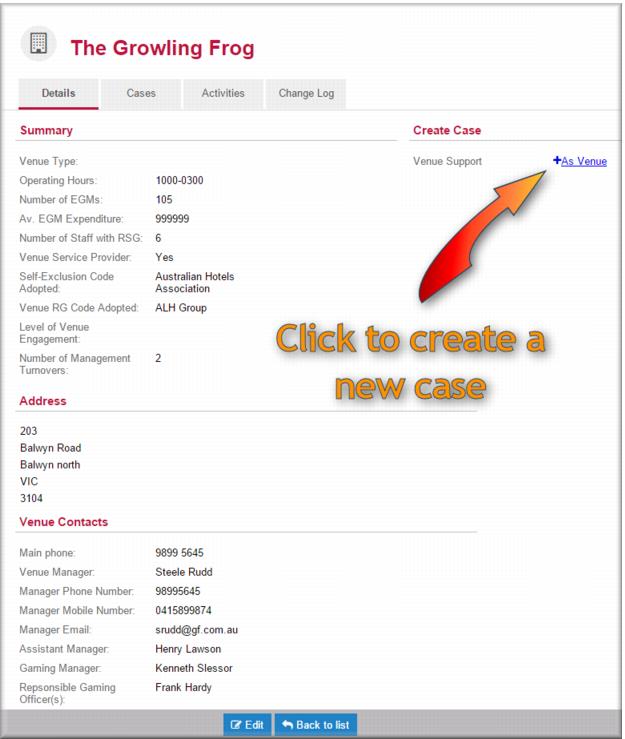
The venue record opens in view mode.
4 In the
Create Case section click

.
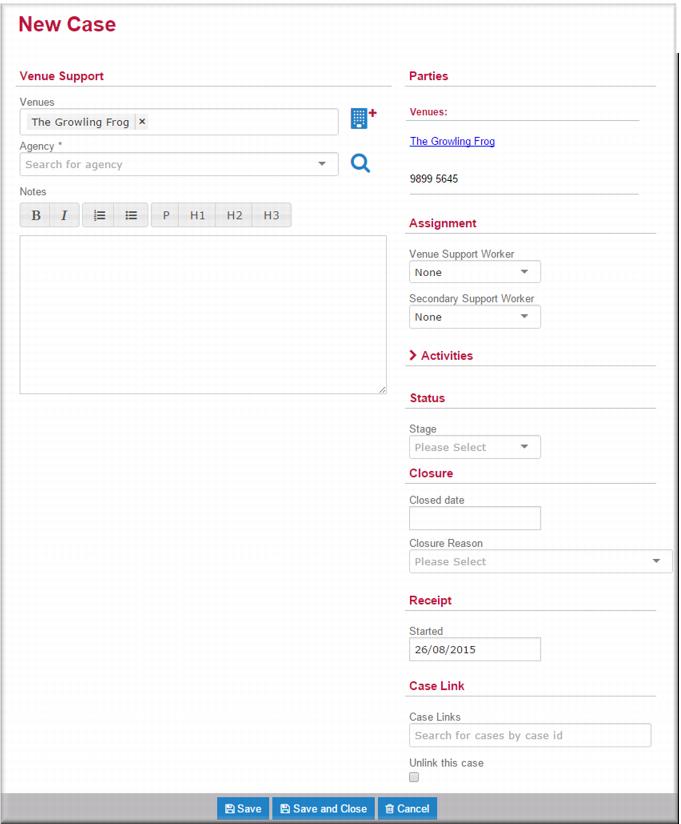
The New Case screen displays with the venue name displayed in the Venues field
. 5 In the
Agency field

select the non-client catchment for this venue.
| MAKE SURE you select the non-client catchment for your agency. If you select the client team the case will disappear from your desktop and you’ll have to ask someone to reassign it for you. |
6 Optionally, in the Notes field enter relevant notes about the venue that will inform your approach to working with the venue in this case.
7 In the Assignment section in the Venue Support Worker, select the name of the person who will be the primary owner of this case.
8 In the
Status section, in the
Stage field,
 In Progress
.
9 Click

.
The new case is created and will now display in the My Cases list of the assigned venue support worker.
![MCj04347200000[1]](../GHC102/images/GHC-102-PM.1.123.7.jpg)