Generating a template document
| Always schedule the school activity BEFORE you generate the booking confirmation document. |
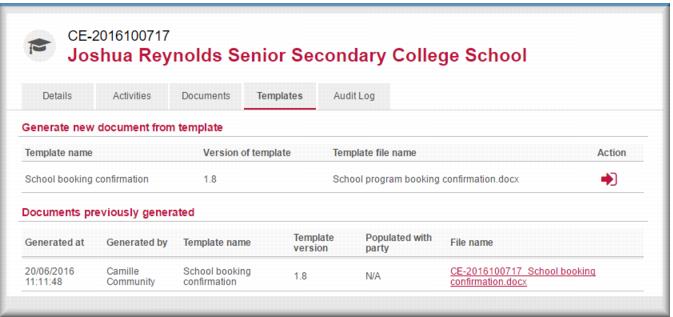
To generate a booking confirmaiton for an upcoming school presentation:
1 Open the case record from which you want to generate a template document.
2 Click the Templates tab.
The templates list displays.
3 In the
Action column of the list click

for the template you want to use.
Gambler’s Help Connect generates a word document based on the template and displays it in the Documents previously generated list.
4 In the Documents previously generated section, click the link to the document in the File name column.
The document is downloaded to your PC.
| Document download processes can vary depending on your browser and Windows version. Talk to your local IT support if you need help with this. |
5 You can now open the document for further editing or printing.
![MCj04347200000[1]](../GHC102/images/GHC-102-PM.1.151.1.jpg)
![MCj04347500000[1]](../GHC102/images/GHC-102-PM.1.151.4.jpg)