![MCj04347500000[1]](../GHC102/images/GHC-102-PM.1.031.01.jpg) | The Select Filter field has a long list of possible values you can select. These are separated by grey headings. As you get to know the values in the list you will find that the predictive search function can be your good friend here. |
| The Select Filter field has a long list of possible values you can select. These are separated by grey headings. As you get to know the values in the list you will find that the predictive search function can be your good friend here. |
 Match All – the search result is limited to only TC cases for that userMatch Any – the search results will show all TC cases and all cases of any type for that user.
 button, Gambler’s Help Connect downloads your search result to your computer as a comma separated values (.csv) file which you can then open in Excel.
![MCj04347500000[1]](../GHC102/images/GHC-102-PM.1.031.03.jpg) | The way the export will appear depends on the browser you are using at the time. |
 select the filter you want to use.
 select the filter value associated with your filter selection in step 2.
 .
. button.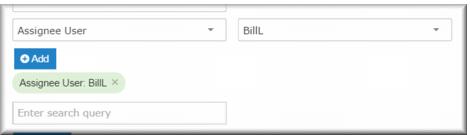
 button.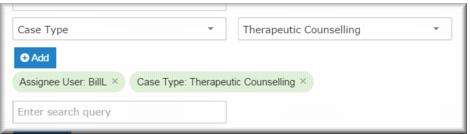
 .
.![MCj04347500000[1]](../GHC102/images/GHC-102-PM.1.031.12.jpg) | If you want to remove a filter expression, click the × symbol on the filter tile. |
Heading | Filter |
Case Type (primary) | Case type |
User | Assignee user |
Dropdown | Case type (secondary): Immediate Danger of Harm to Self/Other Relationship to Gambler Gambling Mode Gambling Type Other Non-Gambler Services Received By Age Bracket (Anon) Anonymous Gender (Anon) Reason for Contact (Anon) Services Provided (Anon) Referred By Service Awareness Referred To (external referrals) Closure Reason Treatment Stage at Closure Stage |
Party | Client Agency No Client |
Tags | Tags |
Activity | Activity Status Activity Type Activity Subtype Activity location Activity mode Duration No Activity Party Staff |
Issue | Issue Issue Outcome No Issue |
Dates (intervals) | Created Updated Received Closed Started |
Dates (date range) | Created Updated Received Closed Started |
Catchment | Catchment |
Timesheet | Direct Time (minutes) Indirect Time (minutes) Travel Time (minutes) |
Filter group | Filter |
Case Type (primary) | Case type |
User | Assignee user |
Dropdown | Stage |
Party | Organisation Agency No Client |
Tags | Tags |
Activity | Activity Status Activity Type Activity Subtype Activity location Activity mode Duration No Activity Party Staff |
Dates (intervals) | Created Updated Received Closed Started |
Dates (date range) | Created Updated Received Closed Started |
Heading | Filter |
Case Type (primary) | Case type |
User | Assignee user |
Dropdown | Stage |
Party | Venue Agency No Client |
Tags | Tags |
Activity | Activity Status Activity Type Activity Subtype Activity location Activity mode Duration No Activity Party Staff |
Dates (intervals) | Created Updated Received Closed Started |
Dates (date range) | Created Updated Received Closed Started |