Monitoring the Pending COS list
A COS 2 is queued to the Pending COS list when a therapeutic or financial counsellor completes a COS 1 by marking its status as Complete. This menu item is only visible to Gambler’s Help Connect users from the Gambler’s Helpline. You use this list to monitor the COS 2 and 3 queue and follow up with clients.
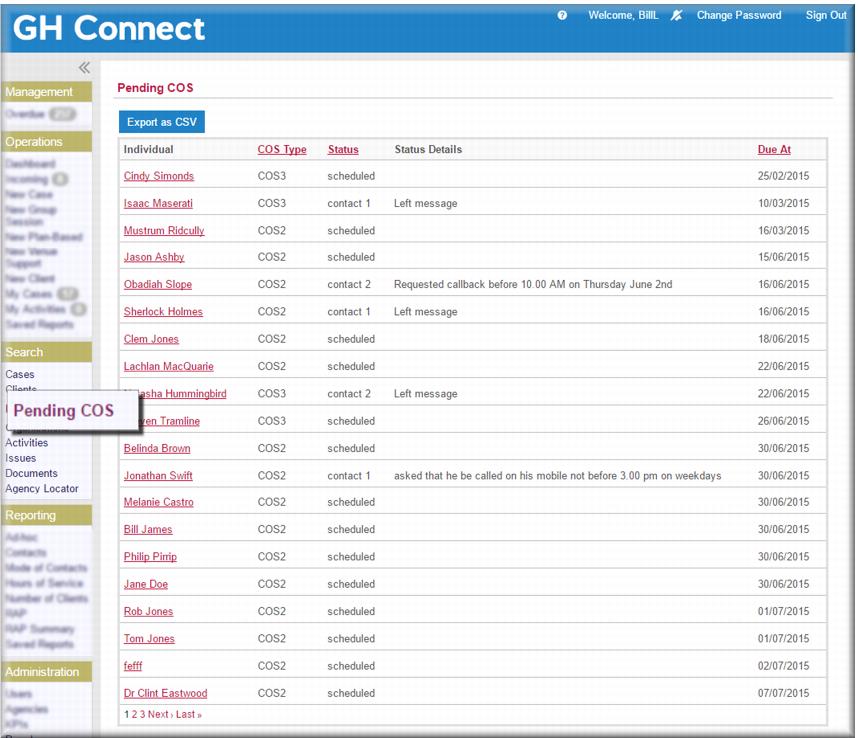
You access the Pending COS list in the menu. It displays:
 A Client Name link that provides access to the COS for that client.
COS type: indicates whether a COS 2 or 3 is due. Status:  Scheduled
 – no follow up has been attempted
Contact 1 – one unsuccessful attempt to obtain the survey information
Contact 2 – two unsuccessful attempts to obtain the survey information
Contact 3 – three unsuccessful attempts to obtain the survey information
Completed – the client provided the required COS information
Cancelled – the client withdrew consent or was unavailable.
Status details: where the status of a COS is Contact, the status details show why the call was unsuccessful. You select a reason from a list of values.
Due at: the date when you are expected to start following a client up for a COS.
When a telephone counsellor completes a COS 2, it displays on the Pending COS list as a scheduled COS 3. When you cancel a COS or complete a COS 3 it no longer displays on the Pending COS list.