Creating case links in an existing case
This procedure can be very helpful in providing case context in a group case. It’s a good idea to make a list of the case numbers you want to link to the case before you start. When you have done this you can then access a linked case with a single mouse click.
1 Open the case you want to link other cases to, for example a group case, in edit mode.
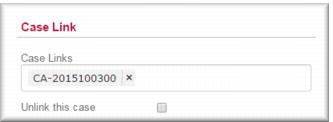
2 In the Case Link field enter the case number of each case you want to link to this case.
| If you enter the last six digits of the case number, Gambler’s Help Connect will recognise the case for you. |
3 Repeat Step 2 until you have added all the required case numbers.
4 Click

.
![MCj04347500000[1]](../GHC102/images/GHC-102-PM.1.074.2.jpg)