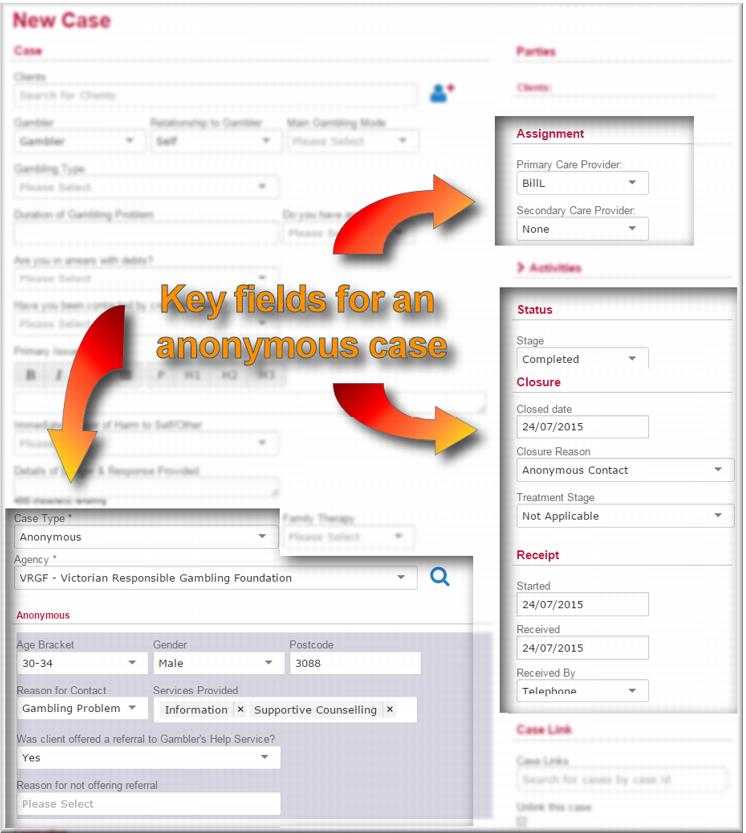
Creating an anonymous practitioner case
To create an anonymous case:
1 From the menu select New Case.
The New Case screen displays.
2 In the
Case Type field,

select
Anonymous.
The Anonymous section of the page is highlighted. 3 In the
Agency field,

select your agency/team.
4 In the Anonymous section specify the details of the anonymous case:
 Age Bracket
 of the anonymous client
Gender Postcode Reason for contact Services Provided – this is a multi-select field so you can add more than one service
IF:

You offered the client a referral to the Gambler’s Help service

select
Yes in that field.
You didn’t offer a referral,

select
No and then select the reason why in the
Reason for not offering referral field.
5 In the
Assignment section, in the
Primary Care Provider field,

select your name.
6 In the
Status section, on the
Stage field,

select
Completed.
7 In the Closure section:
In the
Closure Reason field,

select
Anonymous ContactIn the
Treatment Stage field,

select
Not Applicable.
8 In the
Receipt section, in the
Received By field,

select the contact mode.
9 Click

.
The Anonymous case displays in view mode.