Community education cases for schools or sporting clubs
When you create a new community education case for a school or sporting club you might need to create an organisation record for the school or club. If the school or sporting club is already recorded in Gambler’s Help Connect you can run a search for the organisation record and start a new case. If the organisation is not recorded in Gambler’s Help Connect you will need to create the organisation record before starting the new case.
Creating a new organisation record for a school
1 From the menu select Organisations.
The Organisations list displays.
2 In the search field enter your search term and then click

.
Organisations matching your search terms display in the list. 3 When you are satisfied there is no organisation record for the school click

.
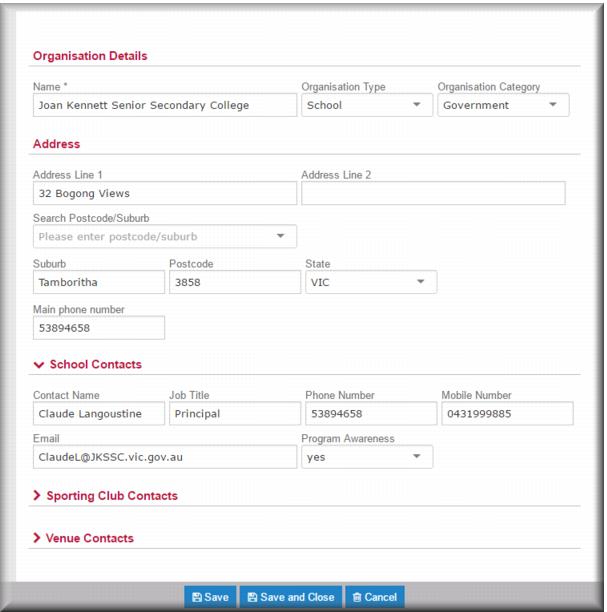
The Organisation Details page displays. 4 In the Name field, enter the name of the school.
5 In the
Organisation Type field

select
School.
The School Contacts section of the page expands to display extra fields relating to a school record. 6 In the
Organisation Category field

select the category.
7 Enter the address details in the relevant fields.
| In the Search Postcode/Suburb field enter the first few letters of the name of the suburb or town, or the postcode, and the field returns a list of matching locations. |
8 In the School Contacts section enter the contact details in the relevant fields.
| If there is more than one contact, enter the details of the second (and subsequent contacts) in the Notes section of the Organisation record. |
9 Click

.
The Organisations list displays with your new organisation displayed at the top of the list ready for you to start the new case. Creating a new organisation record for a sporting club
1 From the menu select Organisations.
The Organisations list displays.
2 In the search field enter your search term and then click

.
Organisations matching your search terms display in the list. 3 When you are satisfied there is no organisation record for the sporting club click

.
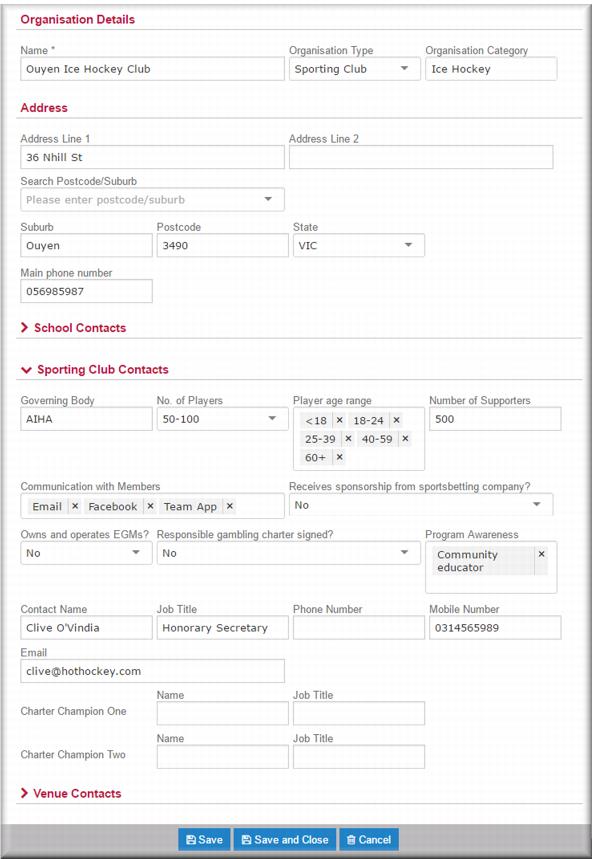
The Organisation Details page displays. 4 In the Name field, enter the name of the sporting club.
5 In the
Organisation Type field

select
Sporting Club.
The Sporting Club Contacts section of the page expands to display extra fields relating to a sporting club record. 6 In the
Organisation Category field

select the category.
| If the sport isn’t on the category list select Other. When you do this a free text field displays in which you can enter the sport. |
7 Enter the address details in the relevant fields.
| In the Search Postcode/Suburb field enter the first few letters of the name of the suburb or town, or the postcode, and the field returns a list of matching locations. |
8 In the Sporting Club Contacts section enter the contact details in the relevant fields.
| If there is more than one contact, enter the details of the second (and subsequent contacts) in the Notes section of the Organisation record. |
9 Click

.
The Organisations list displays with your new organisation displayed at the top of the list ready for you to start the new case. Creating a community education case for a school or sporting club
You start with an organisation search:
1 From the menu select Organisations.
The Organisations list displays.
2 In the search field enter your search term and then click

.
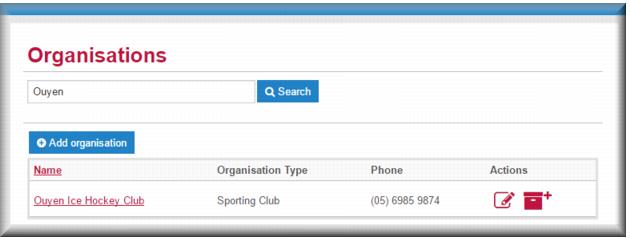
Organisations matching your search terms display in the list. 3 Click the Name link for the organisation for which you want to create a new community education case.
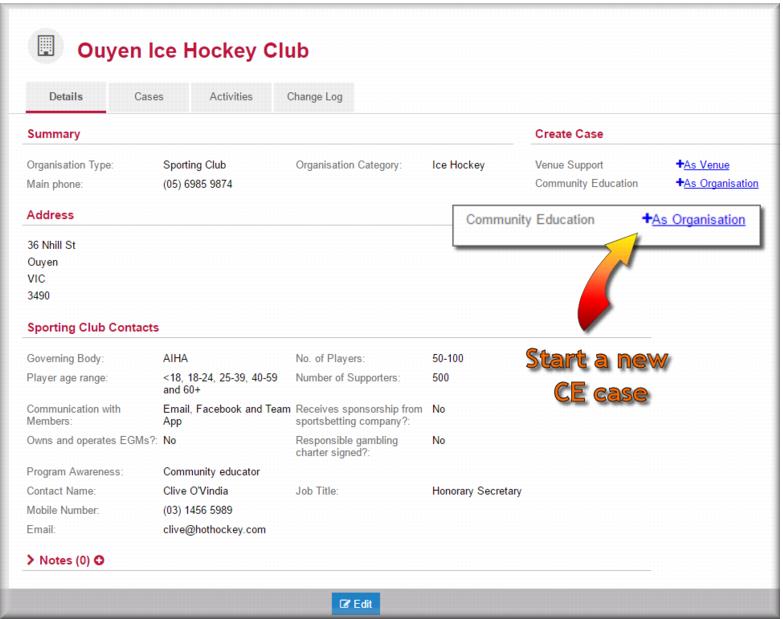
The organisation record displays in view mode.
| You can add descriptive or explanatory notes, about an organisation, separate from any case notes you might make if desired. Click  in the Notes section to open the notes page for the organisation. |
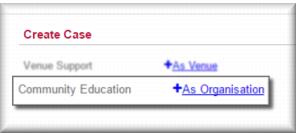
4 In the Create Case section, click + As Organisation for community education as illustrated above.
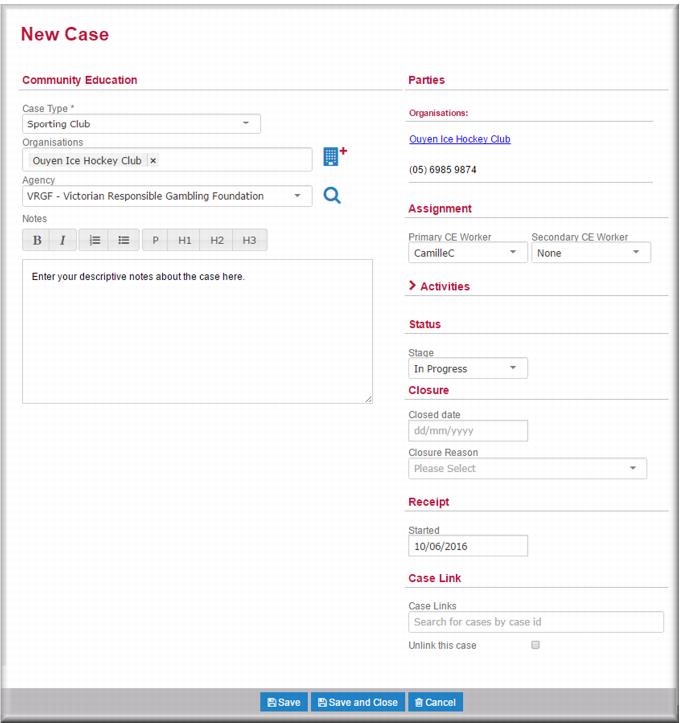
The New Case page opens with the organisation name displayed in the Organisations field.
5 In the Community Education section:

In the
Case Type field,

select the case type.
In the
Agency field,

select your agency.
In the
Notes field, enter such notes that are relevant or applicable to the case.
6 In the Assignment section:
In the
Primary CE Worker field

select the community education worker who will have primary carriage of the case.
IF required,

select a secondary community education worker.
7 In the
Status section, in the
Stage field,

select
In Progress.
8 Click

.
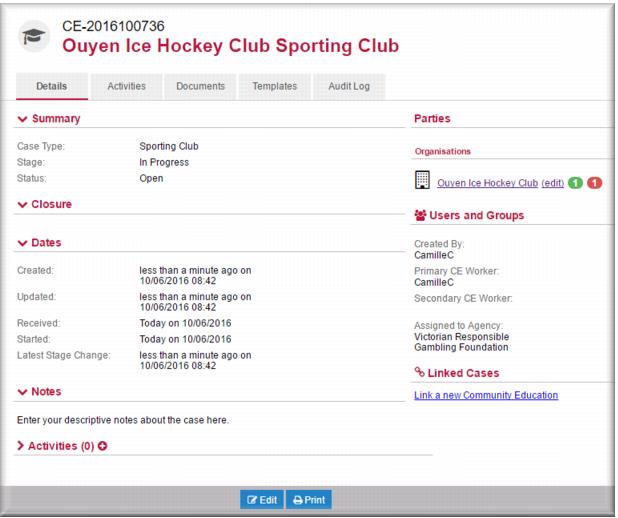
The case record displays in view mode. You can start recording activities against the case. 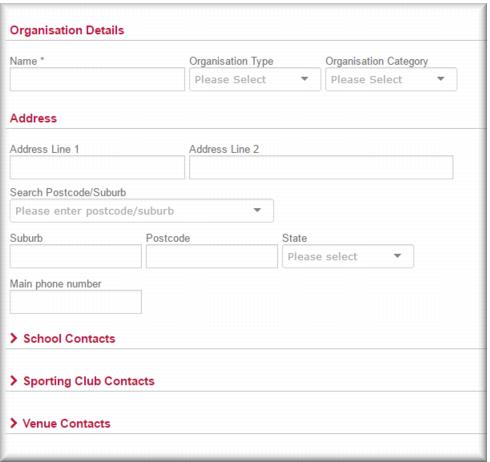
![MCj04347500000[1]](../GHC102/images/GHC-102-PM.1.143.07.jpg)
![MCj04347500000[1]](../GHC102/images/GHC-102-PM.1.143.08.jpg)
![MCj04347500000[1]](../GHC102/images/GHC-102-PM.1.143.15.jpg)
![MCj04347500000[1]](../GHC102/images/GHC-102-PM.1.143.16.jpg)
![MCj04347500000[1]](../GHC102/images/GHC-102-PM.1.143.17.jpg)
![MCj04347500000[1]](../GHC102/images/GHC-102-PM.1.143.22.jpg)