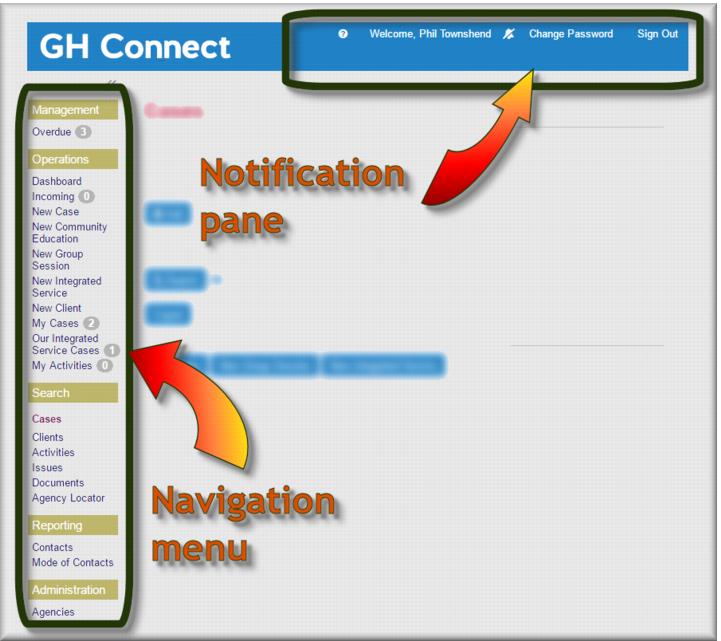

 Access the online help for Gambler’s Help Connect
  View who is logged into Gamblers Help ConnectView any reminders you have:
 - reminders
 - no reminders.
  Change your password
 Sign out of Gamblers Help Connect.ManagementOperationsSearchReportingAdministration
![MCj04347500000[1]](../GHC102/images/GHC-102-PM.1.010.9.jpg) | You may or may not see all these options. What you can see will depend on your role and user permissions. |
Navigation Option | Used to… |
Management | |
Overdue | Cases referred in to your agency that have not received a response within the mandated period. |
Operations | |
Dashboard | Show key statistics for individual, team and agency. |
Incoming | These are all incoming cases assigned to your agency. |
New Case | Create a new client case. |
New Community Education | Create a new community education case. |
New Group Session | Create a new group session. |
New Integrated Service | Create a new integrated service case. |
New Venue Support | Create a new venue support case. |
New Client | Add a new client. |
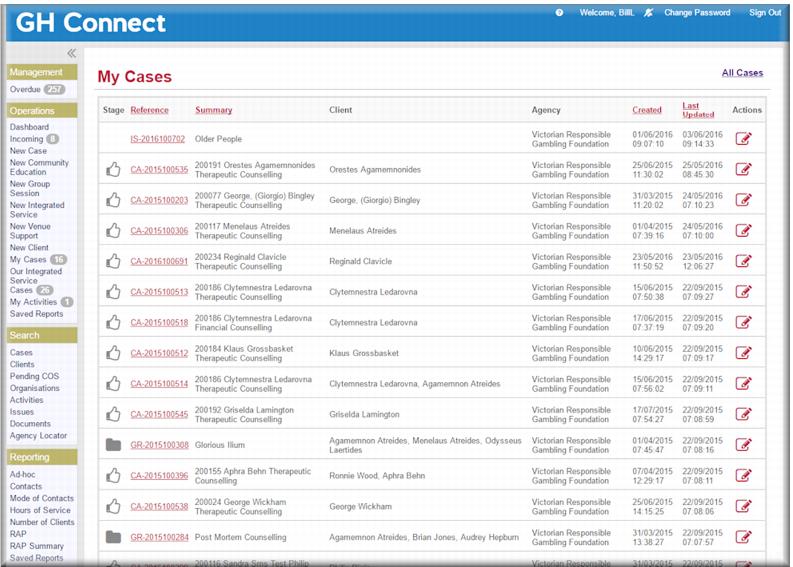
My Cases | View and edit your assigned cases |
Our Integrated Service | View and edit integrated service cases at your agency |
My Activities | View your pending (or overdue) activities |
Search | |
Cases | Search cases from your agency. |
Clients | Search clients |
Pending COS | Telephone counsellors at the Gambling Helpline monitor this list to follow up with clients for the Client Outcome Survey. |
Organisations | Search for organisations or add a new organisation. |
Activities | Display and search all activities at your agency. |
Issues | Search for cases by co-presenting a co-presenting issue or group of issues. |
Documents | View documents attached to cases or activities. |
Agency Locator | Search for an agency service outlet by suburb or postcode. |
Reporting | |
Run pre-configured and on-the-fly reports. | |