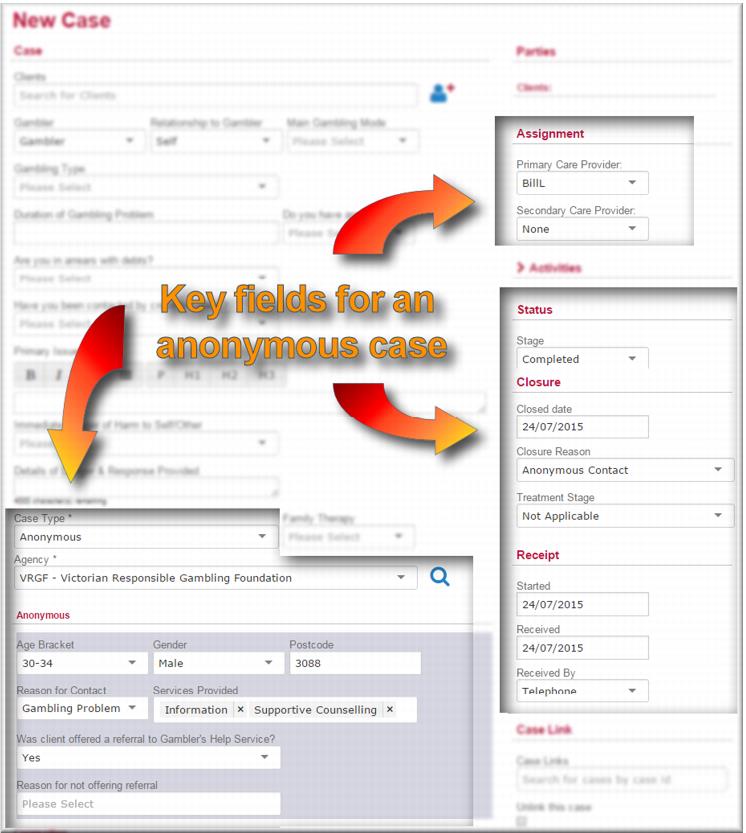
 select Anonymous.
 select your agency/team.
 Age Bracket of the anonymous clientGenderPostcodeReason for contactServices Provided – this is a multi-select field so you can add more than one serviceIF:
 You offered the client a referral to the Gambler’s Help service
  select Yes in that field.You didn’t offer a referral,
  select No and then select the reason why in the Reason for not offering referral field.
 select your name.
 select Completed.In the Closure Reason field,
  select Anonymous ContactIn the Treatment Stage field,
  select Not Applicable.
 select the contact mode.
 .
.![MCj04347500000[1]](../GHC102/images/GHC-102-PM.1.049.12.jpg) | If you are an intake worker or counsellor processing an anonymous case at your local service, you should record an anonymous activity to account for your time. See Processing an anonymous activity if you’re not sure how to do this. |