Recording unsuccessful COS calls
There might be times when you are following up a COS 2 or 3 with a client that you can’t get a response on your first attempt. The client might be busy and ask you to call back later, the phone might ring out without an answer or go to voicemail. In these situations you are expected to make three attempts at contact before cancelling.
In other situations it will be obviously fruitless to attempt further follow up. The client might withdraw consent, the phone number might be disconnected or wrong.
You manage these scenarios using the Status field in the COS screen to record the reason why you were unable to record a COS 2 or 3 on this occasion. When this happens you save the uncompleted COS record with the status of contact. By doing this you show you’ve followed up on the COS and the reason why it was unsuccessful on this occasion. When a COS has the status of Contact it remains on the Pending COS list, when you cancel, it is removed from the list.
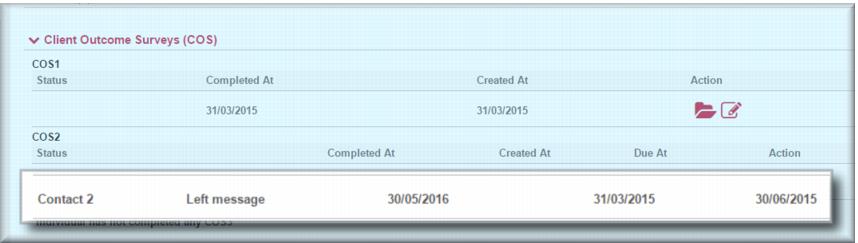
The illustration below shows an example of an attempted COS 2.
Process overview
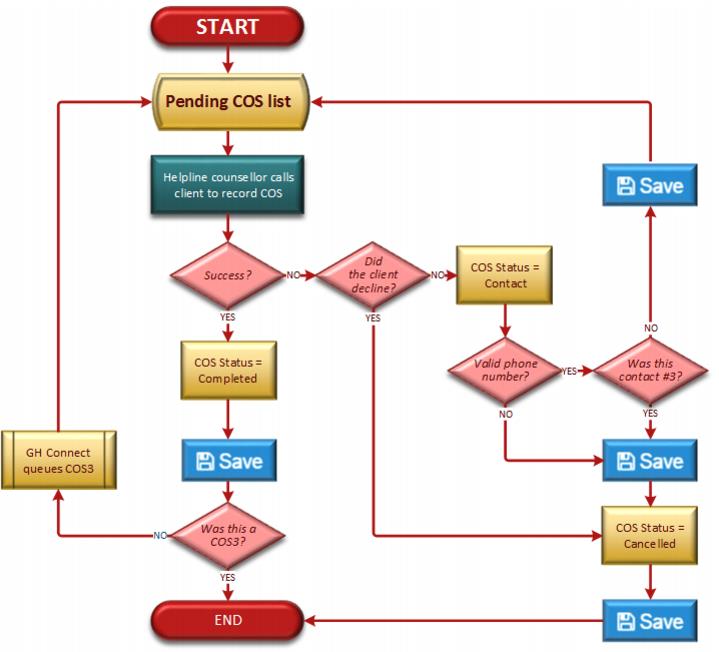
The diagram below gives an overview of the process.
If the client doesn’t answer or you leave a message…
1 In the
Status field

select
Contact 2 In the
Contact outcome 
the relevant value
3 Click

.
If the client answers and asks you to call back later…
1 In the
Status field

select
Contact 2 In the
Contact outcome 
select the relevant value
3 In the Other contact outcome free text field, summarise the callback request
4 Click

.
If the phone number is disconnected or wrong
1 In the
Status field

select
Contact 2 In the
Contact outcome 
the relevant value
3 Click

4 Re-open the COS
5 In the
Status field

select
Cancelled 6 In the
Reason for cancellation field

select
Unable to be contacted 7 Click

.
If the client doesn’t want to participate
1 In the
Status field

select
Cancelled 2 In the
Reason for cancellation field

select
Declined to participate 3 Click

.