Creating a practitioner group case
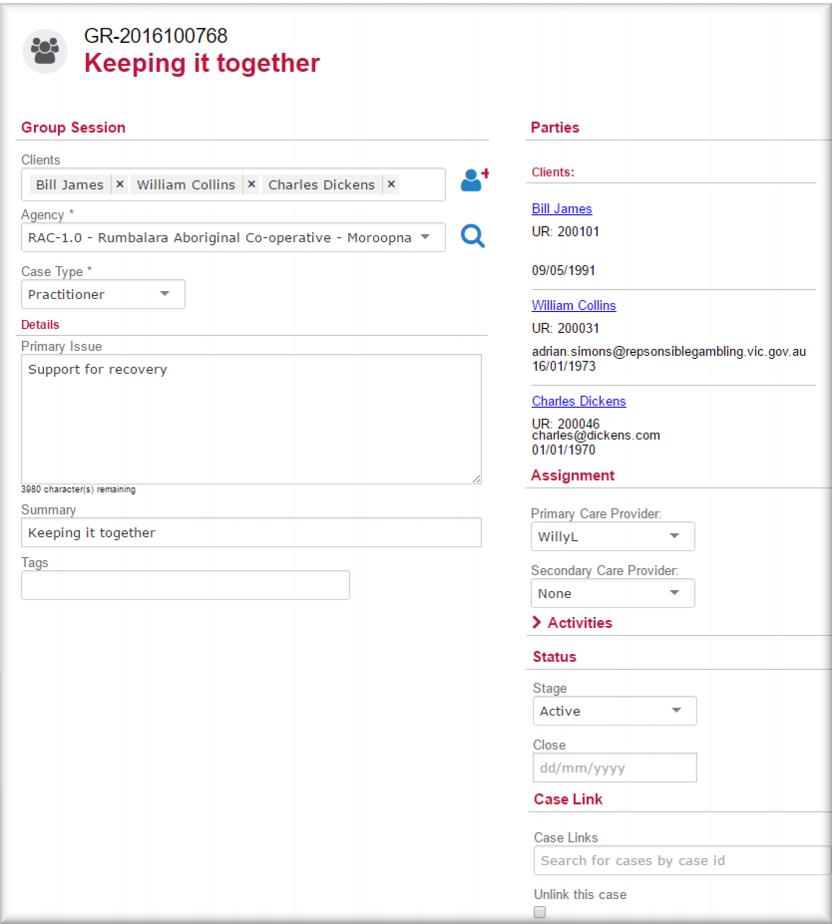
1 In the menu select New Group Session.
The New Case for group sessions screen displays.
2 In the Clients enter and select the names of the clients you want to participate in this group.
3 In the
Agency field

select the agency where the group will run.
4 In the
Case Type field

select
Practitioner.
5 In the Narrative field enter a description of the group session or program.
6 In the Summary field enter the name of the group.
This will be the name of the group that displays in your case list.
7 In the
Assignment section,

select the
Primary Care Provider.
8 IF another practitioner is going to share management of the case with you,

select them on the
Secondary Care Provider field.
9 In the
Status section, in the
Stage field

select
Active.
10 Click

.
![MCj04347500000[1]](../GHC102/images/GHC-102-PM.1.102.8.jpg)