Closing cases
It’s good practice to close a case when it is no longer active. If a client re-presents after an interval, it is better to create a new case than to re-animate an old one.
You close a case when:

Your program with the client is complete
A client has disengaged from the program
There has been no contact with the client for more than three months.
| Case closure statistics are important to our shared understanding of the Gambler’s Help program. They help us understand our client’s trajectory to and through the program. |
Before closing a case you should
cancel or
complete any open activities. If the client has not been in contact you might try to get in touch to find out whether they want to finish their service.
Closing a practitioner case
You close a case by changing the case stage. When you have completed all necessary preparations:
1 Open the case you want to close and click

.
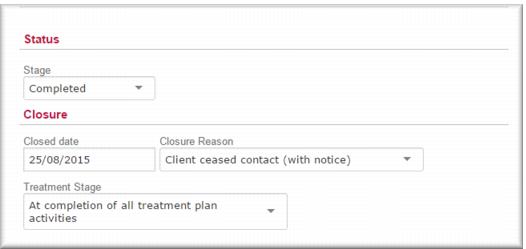
2 In the
Status section in the
Stage field,

select
Completed.
3 In the
Closure section, in the
Closed Date field,

select the closure date.
4 In the
Closure Reason field,

select the reason.
5 In the
Treatment Stage field,

select the treatment stage.
6 Click

.
7 Record a case type activity for case closure.
8 Click
 The case is closed and no longer displays in your My Cases list.
Closing a group case
Closing a group case is a very simple process:
1 Open the case you want to close and click

.
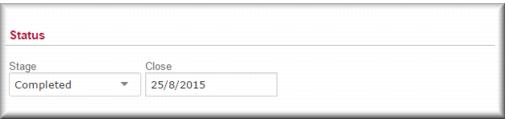
2 In the
Status section, in the
Stage field,

select
Completed.
3 In the
Close field,

select the closure date.
4 Click

.
5 Record an administrative type activity for the group case closure.
6 Click

.
The group case is closed and no longer displays in your My Cases list.
![MCj04347500000[1]](../GHC102/images/GHC-102-PM.1.114.01.jpg)