Defining the goals for an integrated service case
Having set up a new case, the next procedure is to define the goal(s) people working on the case intend to achieve. Typically, an integrated service case will have a single goal, although there might be cases where two goals might be considered appropriate. A goal can have multiple objectives.
You specify goals on the Details tab of the case record:
1 Click

next to the
Goals section of the page.
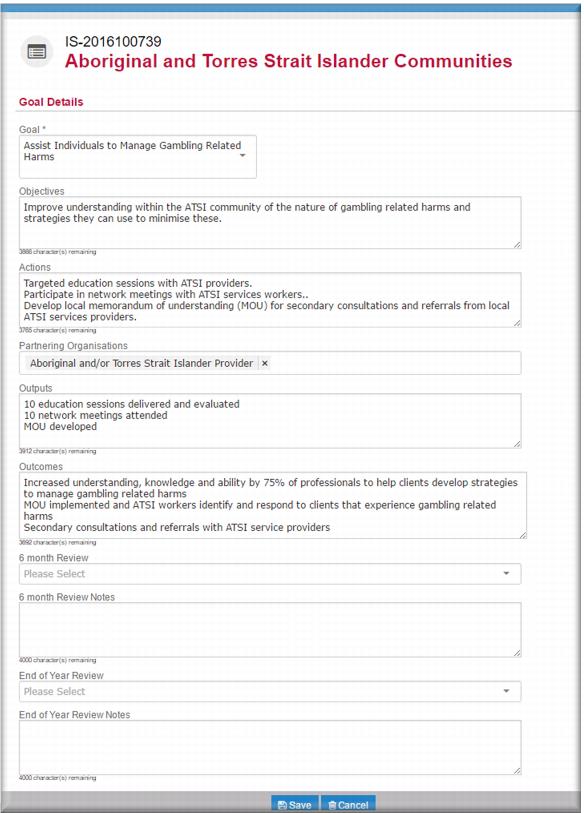
The Goal Details page displays. 2 In the
Goal field,

select the goal.
3 In the Objectives field, enter the objectives to be achieved in pursuit of this goal.
4 In the Actions field, enter the actions that will contribute to meeting the objectives for this goal.
5 In the
Partnering Organisations field,

select the organisation type (or organisations) with whom you intend to work in pursuing this goal.
6 In the Outputs field, enter the outputs that quantify the actions your agency will undertake in pursuit of this goal.
7 In the Outcomes field, enter the outcomes you anticipate will come from the actions you will take in pursuit of the goal.
8 Click

.
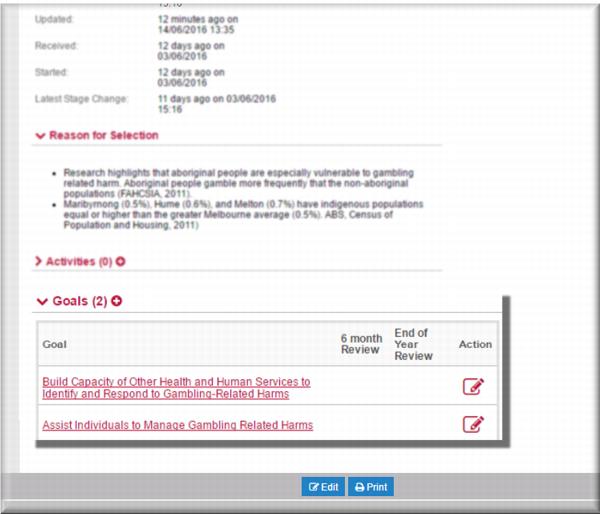
The
Details tab of the case page displays with the goal now added to the list.
9 Repeat these steps to add all the required goals for this case.
The IS case is ready for review and endorsement from the foundation.